Mandis Shop
Home > Brands > Remote controls Denon > Remote control for Denon RC1157 > Interactive key distribution Denon RC1157

Interactive key distribution Denon RC1157

Go to the remote

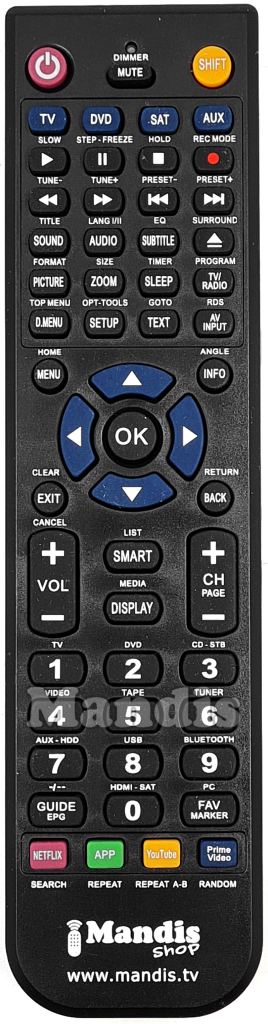
To facilitate the transition to the new remote control, we have created an interactive tool that allows you to identify the function of each button.


How to use the tool:

  1. Look at the images of the two remote controls: the original (left) and the replacement (right).
  2. Hover over a button on the original remote control. Press the button on mobile devices.
  3. Watch how the corresponding button on the replacement remote control lights up:
    • Blue: Direct function (without needing to press the SHIFT key).
    • Green: Function that requires pressing the SHIFT key before pressing the button.

Additional information:

  • SHIFT key: Some buttons on the replacement remote control require pressing the SHIFT key before pressing another button to perform certain functions. If a button on the original remote control requires the SHIFT key, it will be indicated in the image.

If you have any questions or need help using the new remote control, feel free to contact us.

Standby
On
BD
SAT/CBL
TV
USB/Ipod
DVD
V.AUX
Dock
Tuner
Game
Source Select
Quick Select 1
Quick Select 2
Quick Select 3
Quick Select 4
CH+
Vol+
CH-
Vol-
No function
Mute
Menu
CH Level/Top Menu
Return
Search/Setup
Up
Down
Right
Left
Enter
>>/Mode
Play
I
>>I/Tuning+
Pause
Stop
1
2
3
4
5
6
7
8
9
0
+10/Memory
Shift/Link Menu
Movie
Music
Game
Direct
Sleep
Power Tv
Input Tv
Power Device
Standby Device
On
Standby
Mute
No function
Play
No function
Pause
No function
Stop
No function
No function
No function
<</Band
No function
>>/Mode
No function
I<</Tuning-
No function
>>I/Tuning+
No function
No function
No function
Music
No function
No function
No function
No function
No function
Movie
No function
No function
No function
Sleep
No function
Direct
No function
CH Level/Top Menu
No function
Search/Setup
No function
Game
No function
Source Select
Input Tv
Menu
No function
No function
No function
Up
No function
Left
No function
Enter
Standby Device
Right
No function
Down
No function
No function
No function
Return
No function
Vol+
No function
Vol-
No function
Power Tv
No function
Power Device
No function
CH+
No function
CH-
No function
1
BD
2
DVD
3
TV
4
USB/Ipod
5
Dock
6
Tuner
7
V.AUX
8
No function
9
Game
0
SAT/CBL
Shitf/Link Menu
No function
+10/Memory
No function
Quick Select 1
No function
Quick Select 2
No function
Quick Select 3
No function
Quick Select 4
No function
Instructions for use

Download PDFDownload PDF


Frequently asked questions
Why does both the SHIFT button and another button illuminate sometimes?
When the SHIFT button and another key are illuminated means that to perform this function, you have to press the SHIFT button first and then the other illuminated button.
Why sometimes more than one button are illuminated on the replacement remote control?
When several buttons are illuminated and none of them is the SHIFT button, it means that you can use any of the illuminated keys to perform the function.
What do the green buttons above the remote controls?
Some remote controls can control several devices. In these cases it is necessary to use different codes to perform all functions, and clicking on these buttons you can switch between the codes. If there are no green buttons, it means that the original remote controls only one device or we have been able to put all the functions in the same code.
Why does the "No function" message come up in some buttons?
This means that this button does not perform any function. It may be that a button does not perform any function when a device is controlled, but that it is used when changing device.

Find remote controls
i
Search optionsshow
Copyright © Mandis Shop 2026
Contact us Do you want to be a distributor? Download invoice Customer reviews Terms and Conditions Privacy and cookies policy Payment methods Shipments Shipping information Refund request Withdrawal form Universal Remotes Smart TV Universal remotes for €5